 simply crafted
EDEN
Bible Bingo in Eden: what does a discovered book actually mean?

One book on the Bible Bingo board is dark; another remains light. At the top, a counter reads something like 14/66. What does that number actually tell you? It is worth understanding before treating the board as a list of books read from cover to cover.
A board of discovered books
Bible Bingo arranges Bible books into two groups: the Hebrew-Aramaic Scriptures and the Christian Greek Scriptures. On a phone, the tiles show abbreviated book names. A darker colour highlights those already discovered.
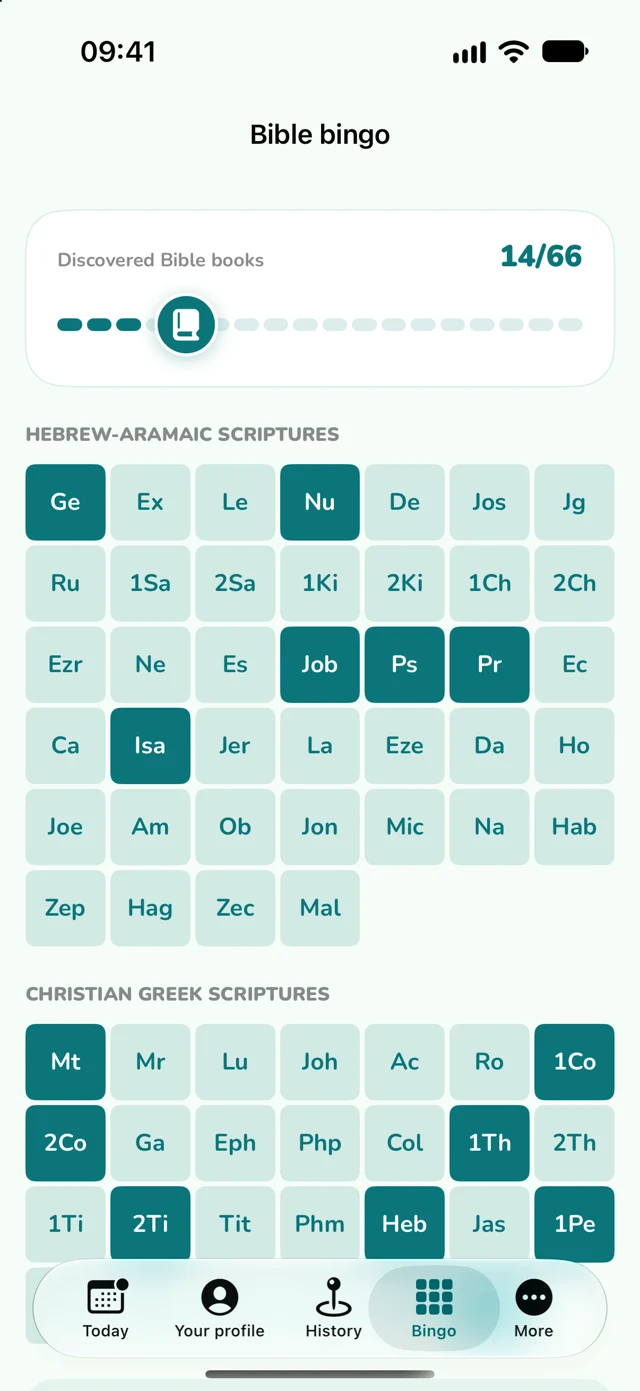
The counter measures distinct discovered books. Revisiting a book does not turn it into another new entry among the 66. The board helps you see which books have been connected with your daily-text encounters.
What marks a book?
In the current Eden app, opening the daily text triggers a connection to the book identified by its verse reference. That book is then recorded as discovered on the board. This mechanism concerns the daily text; it does not automatically track every page you read outside the app.
After opening the text, return to Eden and visit Bingo. Compare the book name with the reference in the passage you read. It is a simple way to connect an abbreviation on the board with a particular place in the Bible.
Discovered does not mean read in full
A marked tile does not confirm that you have read the entire book, from its first chapter to its last. Opening a reference is not proof of attentive reading either. The app records an event, rather than your understanding of the text.
So 14/66 does not mean “I have read 14 complete books.” Treat the counter as a map of discoveries. The separate Bible reading plan helps organize regular reading of longer passages.
An idea for your next reading
Choose one marked book and recall a passage that caught your attention. Then return to the text and read the surrounding verses. If a question or observation comes to mind, save it in Golden Thoughts.
You do not have to fill the board immediately. It can be an invitation to explore more books and return to those you have already encountered.
Download Eden on the App Store. A subscription is required for the app’s main features.